In Strava user interface is it no way to manually change the date of an activity. The date is taken directly from the timestamps recorded in the GPS file. If you by some reason want to change the date in a Strava activity you then need to change the date in the GPS file. Here in a easy way we show you how:
Difficulty: super easy
The tutorials are made in both a video and a text/picture version. The text and video tutorials are divided in two with a quick not detailed walk trough in the first, and then more detailed step by step in the end.
VIDEO TUTORIAL
QUICK TEXT TUTORIAL
In Strava activity window, under "Actions" download the GPX file. Open the GPX file in Notepad, text edit or other "find and replace" tools. With find and replace tool, change the date on all timestamps in the GPX file. Save the GPX file. Upload to Strava....DONE!
Step1, download GPX file:
In the activity window (as header picture), go in under actions and choose to download the gpx file. Save it where ever you want , on desktop etc
Step2, open gpx file in Notepad:
Right click on the icon and choose to open with Notepad (PC) or TextEditor (mac).
Alternative open Notepad or TextEditor first and open the GPX file from file menu.
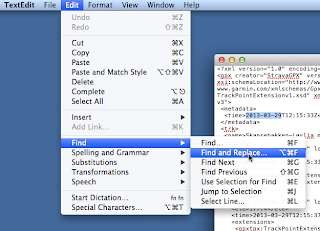
Step3, open find and replace :
Under Edit in the TextEditor menu open the Find and Replace option. In the Notepad on PC, I am sure where you find it ( sorry I am on MAC)
Alternative you can use an online find and replace editor site:
Textmechanic.com/Find-and-Replace-Text
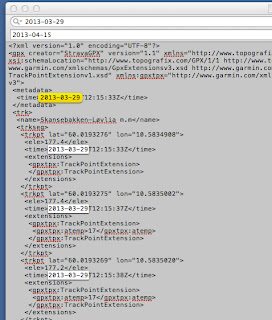 Step4 Copy and Paste:
Copy the date in one timestamp PC: Ctrl+C or Mac: cmd+C
Then paste it in in the find area: PC: Ctrl+V or Mac: cmd+V
Paste the same date in the replace area, then change it to the date you want to. Keep in mind to have it in the same date format.
Step5 Find and Replace:
Run the find and replace tool. choose to replace all.
Optional you can replace one first to verify that it works, format is correct. After all are replaced press "done"
Step6 Save:
Save the document. Be sure that its still a GPX file when you save it. And keep it as a GPX file the entire process.
Step7 Upload GPX:
Upload the GPX file to Strava. In upload activity menu, choose upload from file,
find your Date edited GPX file, upload and............... DONE!


